MT Object
MT transfer functions come in all kinds of formats and flavors. The goal of MT is to centralize and standardize an MT transfer function with common metadata and accessibility to the data. MT inherits `mt_metadata.transfer_function.core.TF <https://mt-metadata.readthedocs.io/en/latest/source/tf_structure.html>`__ which has the ability to read/write in various file types. If there is a file type that is not supported yet raise an issue in
mt-metadata.
Format |
Description |
Extension |
Read |
Write |
|---|---|---|---|---|
EDI |
Common SEG format |
.edi |
yes |
yes |
EMTF XML |
Anna Kelbert’s XML Format for archiving at IRIS |
.xml |
yes |
yes |
Z-Files |
Output from Gary Egberts processing code |
.zmm, .zss, .zrr |
yes |
yes |
J-Files |
Alan Jones’ format and output of Alan Chave’s BIRRP code |
.j |
yes |
no |
Zonge AVG |
Zonge International processing code output |
.avg |
yes |
no |
The MT has a couple of important attributes and method that are described below as we progress through an example file. Here we will look at an EMTF XML because this format has the most comprehensive metadata so far.
[1]:
from mtpy import MT
from mt_metadata import TF_XML
[2]:
mt_object = MT(TF_XML)
mt_object.read()
TF Metadata
Important in describing the transfer function are metadata attributes, namely the location, what survey the station was collected in, timing, and how the data were processed. These are contained in logical metadata objects. For further reading on metadata objects see MT-metadata
MT.survey_metadata: describes the general survey details that this transfer function belongs to.MT.station_metadata: describes the station location, timing, runs processed, processing scheme.MT.station_metadata.transfer_function: describes how the data were processed.MT.station_metadata.runs: provides details on the runs processed, timing, sample rate, channels recorded, data logger details.MT.station_metadata.runs[run_id].channels: describes channel metadata including timing, sensors, location.
Survey Metadata
Survey metadata provides information about the survey ID, geographic locations, who aquired the data, is there a DOI associated with the data or publications, how the data can be used, licenses, and general information about the overall survey.
[3]:
mt_object.survey_metadata
[3]:
{
    "survey": {
        "acquired_by.author": "National Geoelectromagnetic Facility",
        "citation_dataset.authors": "Schultz, A., Pellerin, L., Bedrosian, P., Kelbert, A., Crosbie, J.",
        "citation_dataset.doi": "doi:10.17611/DP/EMTF/USMTARRAY/SOUTH",
        "citation_dataset.title": "USMTArray South Magnetotelluric Transfer Functions",
        "citation_dataset.year": "2020-2023",
        "citation_journal.doi": null,
        "comments": "copyright.acknowledgement:The USMTArray-CONUS South campaign was carried out through a cooperative agreement between\nthe U.S. Geological Survey (USGS) and Oregon State University (OSU). A subset of 40 stations\nin the SW US were funded through NASA grant 80NSSC19K0232.\nLand permitting, data acquisition, quality control and field processing were\ncarried out by Green Geophysics with project management and instrument/engineering\nsupport from OSU and Chaytus Engineering, respectively.\nProgram oversight, definitive data processing and data archiving were provided\nby the USGS Geomagnetism Program and the Geology, Geophysics and Geochemistry Science Centers.\nWe thank the U.S. Forest Service, the Bureau of Land Management, the National Park Service,\nthe Department of Defense, numerous state land offices and the many private landowners\nwho permitted land access to acquire the USMTArray data.; copyright.conditions_of_use:All data and metadata for this survey are available free of charge and may be copied freely, duplicated and further distributed provided that this data set is cited as the reference, and that the author(s) contributions are acknowledged as detailed in the Acknowledgements. Any papers cited in this file are only for reference. There is no requirement to cite these papers when the data are used. Whenever possible, we ask that the author(s) are notified prior to any publication that makes use of these data.\n While the author(s) strive to provide data and metadata of best possible quality, neither the author(s) of this data set, nor IRIS make any claims, promises, or guarantees about the accuracy, completeness, or adequacy of this information, and expressly disclaim liability for errors and omissions in the contents of this file. Guidelines about the quality or limitations of the data and metadata, as obtained from the author(s), are included for informational purposes only.; copyright.release_status:Unrestricted Release",
        "country": [
            "USA"
        ],
        "datum": "WGS84",
        "geographic_name": "CONUS South",
        "id": "CONUS South",
        "name": null,
        "northwest_corner.latitude": 34.470528,
        "northwest_corner.longitude": -108.712288,
        "project": "USMTArray",
        "project_lead.email": null,
        "project_lead.organization": null,
        "release_license": "CC0-1.0",
        "southeast_corner.latitude": 34.470528,
        "southeast_corner.longitude": -108.712288,
        "summary": "Magnetotelluric Transfer Functions",
        "time_period.end_date": "2020-10-07",
        "time_period.start_date": "2020-09-20"
    }
}
Station Metadata
Station metadata is the most important to describe the transfer function, it provides ID, location, timing and then specifics on how the data were processed, run metadata, and channel metadata.
[4]:
mt_object.station_metadata
[4]:
{
    "station": {
        "acquired_by.author": "National Geoelectromagnetic Facility",
        "channels_recorded": [
            "ex",
            "ey",
            "hx",
            "hy",
            "hz"
        ],
        "comments": "description:Magnetotelluric Transfer Functions; primary_data.filename:NMX20b_NMX20_NMW20_COR21_NMY21-NMX20b_NMX20_UTS18.png; attachment.description:The original used to produce the XML; attachment.filename:NMX20b_NMX20_NMW20_COR21_NMY21-NMX20b_NMX20_UTS18.zmm; site.data_quality_notes.comments.author:Jade Crosbie, Paul Bedrosian and Anna Kelbert; site.data_quality_notes.comments.value:great TF from 10 to 10000 secs (or longer)",
        "data_type": "mt",
        "fdsn.id": "USMTArray.NMX20.2020",
        "geographic_name": "Nations Draw, NM, USA",
        "id": "NMX20",
        "location.datum": "WGS84",
        "location.declination.epoch": "2020.0",
        "location.declination.model": "WMM",
        "location.declination.value": 9.09,
        "location.elevation": 1940.05,
        "location.latitude": 34.470528,
        "location.longitude": -108.712288,
        "orientation.angle_to_geographic_north": 0.0,
        "orientation.method": null,
        "orientation.reference_frame": "geographic",
        "provenance.archive.comments": "IRIS DMC MetaData",
        "provenance.archive.name": null,
        "provenance.archive.url": "http://www.iris.edu/mda/ZU/NMX20",
        "provenance.creation_time": "2021-03-17T14:47:44+00:00",
        "provenance.creator.author": "Jade Crosbie, Paul Bedrosian and Anna Kelbert",
        "provenance.creator.email": "pbedrosian@usgs.gov",
        "provenance.creator.name": "Jade Crosbie, Paul Bedrosian and Anna Kelbert",
        "provenance.creator.organization": "U.S. Geological Survey",
        "provenance.creator.url": "https://www.usgs.gov/natural-hazards/geomagnetism",
        "provenance.software.author": null,
        "provenance.software.name": "EMTF File Conversion Utilities 4.0",
        "provenance.software.version": null,
        "provenance.submitter.author": "Anna Kelbert",
        "provenance.submitter.email": "akelbert@usgs.gov",
        "provenance.submitter.name": "Anna Kelbert",
        "provenance.submitter.organization": "U.S. Geological Survey, Geomagnetism Program",
        "provenance.submitter.url": "https://www.usgs.gov/natural-hazards/geomagnetism",
        "release_license": "CC0-1.0",
        "run_list": [
            "NMX20a",
            "NMX20b"
        ],
        "time_period.end": "2020-10-07T20:28:00+00:00",
        "time_period.start": "2020-09-20T19:03:06+00:00",
        "transfer_function.coordinate_system": "geopgraphic",
        "transfer_function.data_quality.good_from_period": 5.0,
        "transfer_function.data_quality.good_to_period": 29127.0,
        "transfer_function.data_quality.rating.value": 5,
        "transfer_function.id": "NMX20",
        "transfer_function.processed_by.author": "Jade Crosbie, Paul Bedrosian and Anna Kelbert",
        "transfer_function.processed_by.name": "Jade Crosbie, Paul Bedrosian and Anna Kelbert",
        "transfer_function.processed_date": "1980-01-01",
        "transfer_function.processing_parameters": [],
        "transfer_function.processing_type": "Robust Multi-Station Reference",
        "transfer_function.remote_references": [
            "NMW20",
            "COR21",
            "UTS18"
        ],
        "transfer_function.runs_processed": [
            "NMX20a",
            "NMX20b"
        ],
        "transfer_function.sign_convention": "exp(+ i\\omega t)",
        "transfer_function.software.author": "Gary Egbert",
        "transfer_function.software.last_updated": "2015-08-26",
        "transfer_function.software.name": "EMTF",
        "transfer_function.software.version": null,
        "transfer_function.units": null
    }
}
Run Metadata
Run metadata is located in MT.station_metadata.runs which is a list-dictionary object that contains the runs used for processing.
[5]:
mt_object.station_metadata.runs
[5]:
OrderedDict([('NMX20a', {
    "run": {
        "channels_recorded_auxiliary": [],
        "channels_recorded_electric": [
            "ex",
            "ey"
        ],
        "channels_recorded_magnetic": [
            "hx",
            "hy",
            "hz"
        ],
        "comments": "comments.author:Isaac Sageman; comments.value:X array at 0 deg rotation. All e-lines 50m. Soft sandy dirt. Water tank ~400m NE. County Rd 601 ~200m SE. Warm sunny day.",
        "data_logger.firmware.author": null,
        "data_logger.firmware.name": null,
        "data_logger.firmware.version": null,
        "data_logger.id": "2612-01",
        "data_logger.manufacturer": "Barry Narod",
        "data_logger.timing_system.drift": 0.0,
        "data_logger.timing_system.type": "GPS",
        "data_logger.timing_system.uncertainty": 0.0,
        "data_logger.type": "NIMS",
        "data_type": "BBMT",
        "id": "NMX20a",
        "sample_rate": 1.0,
        "time_period.end": "2020-09-20T19:29:28+00:00",
        "time_period.start": "2020-09-20T19:03:06+00:00"
    }
}), ('NMX20b', {
    "run": {
        "channels_recorded_auxiliary": [],
        "channels_recorded_electric": [
            "ex",
            "ey"
        ],
        "channels_recorded_magnetic": [
            "hx",
            "hy",
            "hz"
        ],
        "comments": "comments.author:Isaac Sageman; comments.value:X array at 0 deg rotation. All e-lines 50m. Soft sandy dirt. Water tank ~400m NE. County Rd 601 ~200m SE. Warm sunny day.; errors:Found data gaps (2). Gaps of unknown length: 1 [1469160].]",
        "data_logger.firmware.author": null,
        "data_logger.firmware.name": null,
        "data_logger.firmware.version": null,
        "data_logger.id": "2612-01",
        "data_logger.manufacturer": "Barry Narod",
        "data_logger.timing_system.drift": 0.0,
        "data_logger.timing_system.type": "GPS",
        "data_logger.timing_system.uncertainty": 0.0,
        "data_logger.type": "NIMS",
        "data_type": "BBMT",
        "id": "NMX20b",
        "sample_rate": 1.0,
        "time_period.end": "2020-10-07T20:28:00+00:00",
        "time_period.start": "2020-09-20T20:12:29+00:00"
    }
})])
To access a single run you can use either the index of the run or the run.id
[6]:
mt_object.station_metadata.runs[0]
[6]:
{
    "run": {
        "channels_recorded_auxiliary": [],
        "channels_recorded_electric": [
            "ex",
            "ey"
        ],
        "channels_recorded_magnetic": [
            "hx",
            "hy",
            "hz"
        ],
        "comments": "comments.author:Isaac Sageman; comments.value:X array at 0 deg rotation. All e-lines 50m. Soft sandy dirt. Water tank ~400m NE. County Rd 601 ~200m SE. Warm sunny day.",
        "data_logger.firmware.author": null,
        "data_logger.firmware.name": null,
        "data_logger.firmware.version": null,
        "data_logger.id": "2612-01",
        "data_logger.manufacturer": "Barry Narod",
        "data_logger.timing_system.drift": 0.0,
        "data_logger.timing_system.type": "GPS",
        "data_logger.timing_system.uncertainty": 0.0,
        "data_logger.type": "NIMS",
        "data_type": "BBMT",
        "id": "NMX20a",
        "sample_rate": 1.0,
        "time_period.end": "2020-09-20T19:29:28+00:00",
        "time_period.start": "2020-09-20T19:03:06+00:00"
    }
}
[7]:
mt_object.station_metadata.runs["NMX20b"]
[7]:
{
    "run": {
        "channels_recorded_auxiliary": [],
        "channels_recorded_electric": [
            "ex",
            "ey"
        ],
        "channels_recorded_magnetic": [
            "hx",
            "hy",
            "hz"
        ],
        "comments": "comments.author:Isaac Sageman; comments.value:X array at 0 deg rotation. All e-lines 50m. Soft sandy dirt. Water tank ~400m NE. County Rd 601 ~200m SE. Warm sunny day.; errors:Found data gaps (2). Gaps of unknown length: 1 [1469160].]",
        "data_logger.firmware.author": null,
        "data_logger.firmware.name": null,
        "data_logger.firmware.version": null,
        "data_logger.id": "2612-01",
        "data_logger.manufacturer": "Barry Narod",
        "data_logger.timing_system.drift": 0.0,
        "data_logger.timing_system.type": "GPS",
        "data_logger.timing_system.uncertainty": 0.0,
        "data_logger.type": "NIMS",
        "data_type": "BBMT",
        "id": "NMX20b",
        "sample_rate": 1.0,
        "time_period.end": "2020-10-07T20:28:00+00:00",
        "time_period.start": "2020-09-20T20:12:29+00:00"
    }
}
Channel Metadata
Channel metadata is important because it describes orientation, location, sensors of each channel. These are accessed through the run. Similar to the runs direct access can be through the index or component name.
[8]:
mt_object.station_metadata.runs[0].channels[0]
[8]:
{
    "magnetic": {
        "channel_number": 0,
        "component": "hx",
        "data_quality.rating.value": 0,
        "filter.applied": [
            false
        ],
        "filter.name": [],
        "location.elevation": 0.0,
        "location.latitude": 0.0,
        "location.longitude": 0.0,
        "location.x": 0.0,
        "location.y": 0.0,
        "location.z": 0.0,
        "measurement_azimuth": 9.1,
        "measurement_tilt": 0.0,
        "sample_rate": 0.0,
        "sensor.id": "2509-23",
        "sensor.manufacturer": "Barry Narod",
        "sensor.name": "NIMS",
        "sensor.type": "fluxgate",
        "time_period.end": "2020-09-20T19:29:28+00:00",
        "time_period.start": "2020-09-20T19:03:06+00:00",
        "translated_azimuth": 9.1,
        "type": "magnetic",
        "units": null
    }
}
[9]:
mt_object.station_metadata.runs[0].channels["hy"]
[9]:
{
    "magnetic": {
        "channel_number": 0,
        "component": "hy",
        "data_quality.rating.value": 0,
        "filter.applied": [
            false
        ],
        "filter.name": [],
        "location.elevation": 0.0,
        "location.latitude": 0.0,
        "location.longitude": 0.0,
        "location.x": 0.0,
        "location.y": 0.0,
        "location.z": 0.0,
        "measurement_azimuth": 99.1,
        "measurement_tilt": 0.0,
        "sample_rate": 0.0,
        "sensor.id": "2509-23",
        "sensor.manufacturer": "Barry Narod",
        "sensor.name": "NIMS",
        "sensor.type": "fluxgate",
        "time_period.end": "2020-09-20T19:29:28+00:00",
        "time_period.start": "2020-09-20T19:03:06+00:00",
        "translated_azimuth": 99.1,
        "type": "magnetic",
        "units": null
    }
}
Or you can access the channel metadata through a convenience attribute
[10]:
mt_object.ex_metadata
[10]:
{
    "electric": {
        "channel_number": 0,
        "component": "ex",
        "data_quality.rating.value": 0,
        "dipole_length": 100.0,
        "filter.applied": [
            false
        ],
        "filter.name": [],
        "measurement_azimuth": 9.1,
        "measurement_tilt": 0.0,
        "negative.elevation": 0.0,
        "negative.id": "40201037",
        "negative.latitude": 0.0,
        "negative.longitude": 0.0,
        "negative.manufacturer": "Oregon State University",
        "negative.type": "Pb-PbCl2 kaolin gel Petiau 2 chamber type",
        "negative.x": -50.0,
        "negative.y": 0.0,
        "negative.z": 0.0,
        "positive.elevation": 0.0,
        "positive.id": "40201038",
        "positive.latitude": 0.0,
        "positive.longitude": 0.0,
        "positive.manufacturer": "Oregon State University",
        "positive.type": "Pb-PbCl2 kaolin gel Petiau 2 chamber type",
        "positive.x2": 50.0,
        "positive.y2": 0.0,
        "positive.z2": 0.0,
        "sample_rate": 0.0,
        "time_period.end": "2020-09-20T19:29:28+00:00",
        "time_period.start": "2020-09-20T19:03:06+00:00",
        "translated_azimuth": 9.1,
        "type": "electric",
        "units": null
    }
}
Metadata Summary
Metadata is important to keep track of and can be cumbersome, but helps future users of your data to actually use your data. There are a lot of fields here but the most important are ID, location, and timing.
mt.survey_metadata.id
mt.station_metadata.id
mt.station_metadata.location.longitude
mt.station_metadata.location.latitude
mt.station_metadata.location.elevation
mt.station_metadata.time_period.start
mt.station_metadata.time_period.end
mt.station_metadata.transfer_function.processing.parameters
mt.station_metadata.runs[0].channels[component].measurement_azimuth
mt.station_metadata.runs[0].channels[component].measurement_tilt
mt.station_metadata.runs[0].channels[component].translated_azimuth
mt.station_metadata.runs[0].channels[component].translated_tilt
Data
The most interesting part about a transfer function is the data. This describes how the Earth response to inducing magnetic fields. Under the hood an MT object stores a generic transfer function that has input channels (sources) and output channels (reponses) as an xarray.
The benefit of using xarray is that it has tools for combining various statistical estimates and naturally indexes across a common index. In this case we can index along period for each of the statistical estimates (transfer function, errors, and covariances). The mt._transfer_function object is a xarray.Dataset and each statistical estimate is an xarray.DataArray.
The other benefit is that attributes can be store directly alongside the arrays for a self describing object. Here we have picked the most important attributes from the metadata to describe the transfer function. These are propogated with each statistical estimate so anytime you retreive impedance or tipper the attributes are in the xarray.
Note: You’ll see below that input channels and output channels have the same components, that’s because in order to contain the full transfer function and covariances we need a symmetric matrix. Those components that don’t have data are filled with NaNs, which is find for transfer functions because they are relatively small and not memory intensive.
Generic Transfer Function
[11]:
mt_object._transfer_function
[11]:
<xarray.Dataset>
Dimensions:                        (output: 5, input: 5, period: 33)
Coordinates:
  * output                         (output) <U2 'ex' 'ey' 'hx' 'hy' 'hz'
  * input                          (input) <U2 'ex' 'ey' 'hx' 'hy' 'hz'
  * period                         (period) float64 4.655 5.818 ... 2.913e+04
Data variables:
    transfer_function              (period, output, input) complex128 (nan+na...
    transfer_function_error        (period, output, input) float64 nan ... nan
    transfer_function_model_error  (period, output, input) float64 nan ... nan
    inverse_signal_power           (period, output, input) complex128 (nan+na...
    residual_covariance            (period, output, input) complex128 (0.0012...
Attributes: (12/14)
    survey:             CONUS South
    project:            USMTArray
    id:                 NMX20
    name:               Nations Draw, NM, USA
    latitude:           34.470528
    longitude:          -108.712288
    ...                 ...
    datum:              WGS84
    acquired_by:        National Geoelectromagnetic Facility
    start:              2020-09-20T19:03:06+00:00
    end:                2020-10-07T20:28:00+00:00
    runs_processed:     ['NMX20a', 'NMX20b']
coordinate_system: geographicErrors and Covariances
The generic transfer function xarray also contains the covariances (if provided) and errors of the measured data and also has a place for model errors.
Note: If the tranfer function contains inverse_signal_power and residual_covariance then the transfer_function_error is estimated from these values, otherwise the error from the data file is used.
[12]:
mt_object._transfer_function.data_vars
[12]:
Data variables:
    transfer_function              (period, output, input) complex128 (nan+na...
    transfer_function_error        (period, output, input) float64 nan ... nan
    transfer_function_model_error  (period, output, input) float64 nan ... nan
    inverse_signal_power           (period, output, input) complex128 (nan+na...
    residual_covariance            (period, output, input) complex128 (0.0012...
MTpy.core.transfer_function.Base
Each of the transfer function estimates are represented by a base class called mtpy.core.tranfer_function.Base object which has methods like:
inversereturns the inverse of the transfer functionrotaterotates the transfer function positive clockwiseinterpolateinterpolates onto a different period indexto_xarrayreturns anxarray.DataArrayfrom_xarrayingests anxarray.DataArrayto_dataframereturns apandas.DataFramerepresentation of the transfer function indexed by period.from_dataframeingests apandas.DataFramecopyreturn a copy of the transfer function objectcontains validation methods for inputs
It also has attributes:
periodperiod arrayfrequency1/period arraycompscomponents in the transfer function as input channels and output channelsn_periodsnumber of periods
Impedance
The impedance  describes how the Earth electrically responds to horizontal magnetic fields is formed from this generic transfer function.

To is built from the generic transfer function using the horizontal components of the input and output channels. There are two ways to access the impedance from the MT object
mt.impedancewill return an xarray of the impedancemt.impedance_errorwill return the errors in the impedance measurementmt.impedance_model_errorwill return model errors for the impedancemt.Zwill return amtpy.core.transfer_function.Zobject which has methods for accessing impedance tensor attributes, which contains the errors.
If you are not sure the transfer function has impedance you can use the method:
[13]:
mt_object.has_impedance()
[13]:
True
MT.impedance
This is an xarray of the impedance and is computed from the generic transfer function using the horizontal components of the input and output channels.
[14]:
mt_object.impedance
[14]:
<xarray.DataArray 'impedance' (period: 33, output: 2, input: 2)>
array([[[-1.160949e-01-0.2708645j ,  3.143284e+00+1.101737j  ],
        [-2.470717e+00-0.7784633j , -1.057851e-01+0.1022045j ]],

       [[-1.051846e-01-0.1912665j ,  3.169108e+00+1.007867j  ],
        [-2.459892e+00-0.8541335j , -1.325974e-01+0.1473665j ]],

       [[-1.289586e-02-0.1937956j ,  3.064653e+00+1.063899j  ],
        [-2.446347e+00-0.8661013j , -1.222841e-01+0.1580956j ]],

       [[-8.208073e-02-0.3117874j ,  3.042922e+00+1.006518j  ],
        [-2.310078e+00-0.8732821j , -1.620193e-01+0.2110874j ]],

       [[ 3.353187e-02-0.2855585j ,  2.875270e+00+1.083887j  ],
        [-2.135730e+00-0.8666129j , -1.881319e-01+0.2420585j ]],

       [[ 1.014077e-01-0.2989493j ,  2.719818e+00+1.103022j  ],
        [-2.073182e+00-0.8841784j , -3.048077e-01+0.2344493j ]],

       [[ 2.441069e-01-0.2828671j ,  2.493647e+00+1.179619j  ],
        [-1.956353e+00-1.022081j  , -3.447069e-01+0.1793671j ]],
...
       [[ 3.475757e-02+0.0352555j ,  1.770043e-01+0.2258684j ],
        [-1.343957e-01-0.1432316j , -4.149757e-02-0.05223549j]],

       [[ 2.719606e-02+0.03381913j,  1.438796e-01+0.1859595j ],
        [-1.121204e-01-0.1246405j , -3.594606e-02-0.04361913j]],

       [[ 2.161943e-02+0.02911898j,  1.137554e-01+0.150974j  ],
        [-8.744459e-02-0.103626j  , -2.562943e-02-0.03531898j]],

       [[ 1.514583e-02+0.02224749j,  8.349043e-02+0.1184608j ],
        [-6.363958e-02-0.08284923j, -2.077583e-02-0.02673749j]],

       [[ 9.760046e-03+0.01694262j,  5.923743e-02+0.08950258j],
        [-4.535258e-02-0.06544742j, -1.464005e-02-0.02036262j]],

       [[ 1.027061e-02+0.01265869j,  4.057636e-02+0.0674322j ],
        [-3.114365e-02-0.0496578j , -1.030061e-02-0.01919869j]],

       [[ 4.834623e-03+0.00983358j,  2.643963e-02+0.05098311j],
        [-2.203037e-02-0.03744689j, -2.953623e-03-0.01293358j]]])
Coordinates:
  * output   (output) <U2 'ex' 'ey'
  * input    (input) <U2 'hx' 'hy'
  * period   (period) float64 4.655 5.818 7.314 ... 1.872e+04 2.913e+04
Attributes:
    survey:             CONUS South
    project:            USMTArray
    id:                 NMX20
    name:               Nations Draw, NM, USA
    latitude:           34.470528
    longitude:          -108.712288
    elevation:          1940.05
    declination:        9.09
    datum:              WGS84
    acquired_by:        National Geoelectromagnetic Facility
    start:              2020-09-20T19:03:06+00:00
    end:                2020-10-07T20:28:00+00:00
    runs_processed:     ['NMX20a', 'NMX20b']
coordinate_system: geographicMT.Z
The Z object is central to most actions in mtpy and has various attributes that are important to analyzing and visualizing the impedance tensor. Of these are:
resistivityandphaseare the most common way to represent the impedance tensor. Theresistivityis an apparent resistivity that describes the volumetric average of the Earth sampled by hemisphere with a radius related to the period through the skin depth. It provides an estimate on how conductive or resistive the subsurface is as a function of period, a proxy for depth. Thephaseis the impedance phase and describes how subsurface resistivity is changing where 45 degrees indicates no change.res_ijandphase_ijare convenient attributes for accessing only a certain component of the resistivity or phase. If you want to access just the xy component useres_xy.res_detandphase_detrepresent the resistivity and phase of the determinant of the impedance tensor.
phase_tensoris a different way of representing the impedance tensor that is not effected by near surface distortion like static shift. This returns amtpy.core.tranfer function.Baseobject.
[15]:
mt_object.Z
[15]:
Transfer Function impedance
------------------------------
        Number of periods:  33
        Frequency range:        3.43323E-05 -- 2.14844E-01 Hz
        Period range:           4.65455E+00 -- 2.91271E+04 s

        Has impedance:              True
        Has impedance_error:        True
        Has impedance_model_error:  False
[16]:
mt_object.Z.res_xy
[16]:
array([10.3275702 , 12.8686987 , 15.39508701, 18.78391953, 21.9740757 ,
       25.94353835, 29.97081497, 33.72107947, 37.49484018, 39.85170164,
       42.22309955, 44.22664358, 46.57708096, 47.53701478, 48.98712171,
       50.77007139, 52.33463866, 52.41671744, 51.90545285, 51.26697937,
       49.76791648, 46.62343578, 45.61307418, 43.08625057, 40.82330885,
       39.53221291, 37.21859669, 34.50456458, 33.45466823, 30.58872947,
       27.45312204, 23.19428435, 19.21417312])
[17]:
mt_object.Z.phase_tensor
[17]:
Transfer Function phase_tensor
------------------------------
        Number of periods:  33
        Frequency range:        3.43323E-05 -- 2.14844E-01 Hz
        Period range:           4.65455E+00 -- 2.91271E+04 s

        Has phase_tensor:              True
        Has phase_tensor_error:        True
        Has phase_tensor_model_error:  False
MT.Tipper
The tipper represents the induction vectors or the Earth’s magnetic response to horizontal magnetic fields. You get strong induction vectors when horizontal electrical currents flow through the subsurface like along structural boundaries and faults.

Similar to MT.Z there are methods and attributes for analyzing induction vectors.
amplitudeamplitude of the induction vectorsphasephase of the induction vectorsanglehorizontal direction of the induction vectorsmagmagnitude of the induction vectors
There are also attributes for the real and imaginary components
angle_realandangle_imagmag_realandmag_imag
[18]:
mt_object.Tipper.mag_real
[18]:
array([0.10454066, 0.07782623, 0.08104679, 0.08278517, 0.09892832,
       0.12609043, 0.09750211, 0.07730022, 0.06717719, 0.05336503,
       0.04318178, 0.05157183, 0.07753425, 0.10306461, 0.14128244,
       0.17552209, 0.1995196 , 0.21798128, 0.22319936, 0.22839953,
       0.22834729, 0.22250223, 0.21076025, 0.19728602, 0.17894005,
       0.16590773, 0.14505057, 0.10009294, 0.06102891, 0.06275663,
       0.03127006, 0.14861124, 0.17879201])
Visualizing
Have a look at the data provides better information than just looking at arrays. There are a few methods for plotting various components of the impedance tensor.
Plot MT Response
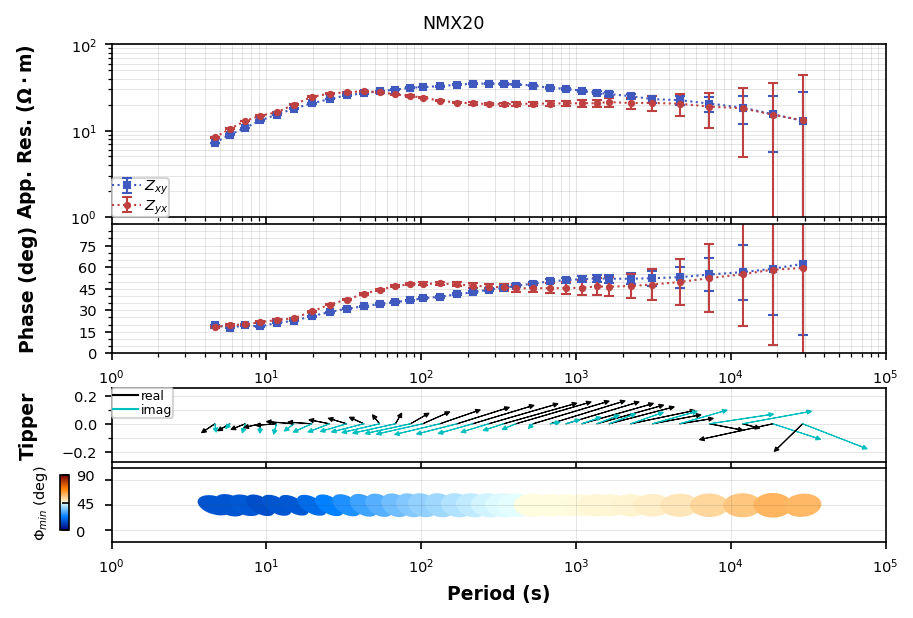
The main visualization is plotting the MT response as apparent resistivity and phase, and if there are induction vectors plot them. This also plots the phase tensor ellipses for completeness. You can turn them on and off if you like.
[19]:
plot_response = mt_object.plot_mt_response()

You can plot all 4 components of the impedance tensor
[20]:
plot_response.plot_num = 2
plot_response.fig_num = 2
plot_response.plot()

Plot Phase Tensor component
Sometimes it can be infomrative to plot the phase tensor components and attributes to determine dimensionality.
[21]:
plot_pt = mt_object.plot_phase_tensor()

Plot Penetration Depth
Another diagnostic of your data is to estimate the depth of penetration. This is done through a Niblett-Bostick transformation.
[22]:
plot_nb = mt_object.plot_depth_of_penetration()

Manipulating MT Response
Often you want to manipulate the transfer function by applying a static shift, rotationg, flipping phases, interpolating. There are tools for this.
Rotate
Data rotation helps align the data with geologic structures and optimzing the transfer function to be quasi 2D for modeling.
Geoelectric strike can be estimated from the phase tensor as seen in the plot above. Here this station appears to have a dominant geoelectric strike within the 2D realm is N270E.
Note: All rotations are clockwise assuming that geographic north = 0, and east is 90.
[23]:
rotated = mt_object.rotate(-270, inplace=False)
rotated.plot_phase_tensor()
[23]:
Plotting PlotPhaseTensor

Interpolate
Interpolating data is useful for standardizing a data set for modeling or comparing. Interpolation is done on each component on both real and imaginary parts using a linear interpolation using scipy.signal.interp1d internally within xarray.
Note: Due to some complexities with xarray of removing Nan values a preliminary interpolation is done to interoplate Nan values using using the original period range, then an interpolation is done onto the new period range given. You can change the type of interpolation for the ‘na_interpolate’ and ‘method’.
[24]:
import numpy as np
[25]:
interpolated = mt_object.interpolate(np.logspace(1, 4, 12))
[26]:
interpolated.plot_mt_response()

[26]:
Plotting PlotMTResponse
Static Shift
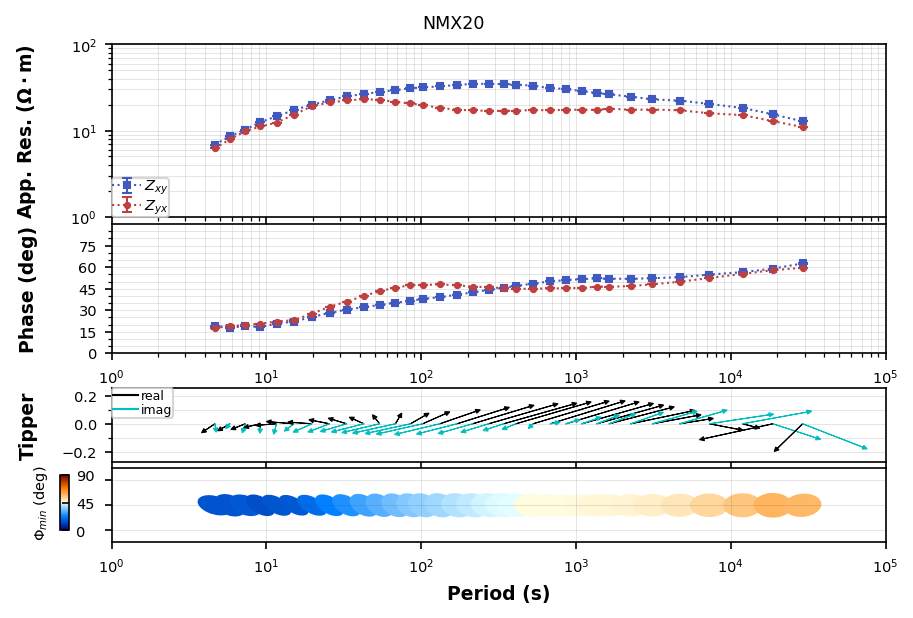
Static shift is a distortion that affects the apparent resisitivity. We can apply a scalar to shift apparent resistivity up or down.

where:
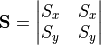
To remove the static shift multiply by 
Note: This assumes that the static shift is given in resistivity coordinates thus the square root of S will be applied.
Note: Numbers great than 1 will move the apparent resisitity down and numbers smaller than 1 will shift apparent resistivity up.
[27]:
static_shifted = mt_object.remove_static_shift(ss_x=1.5)
[28]:
static_shifted.plot_mt_response()
[28]:
Plotting PlotMTResponse
Flip Phase
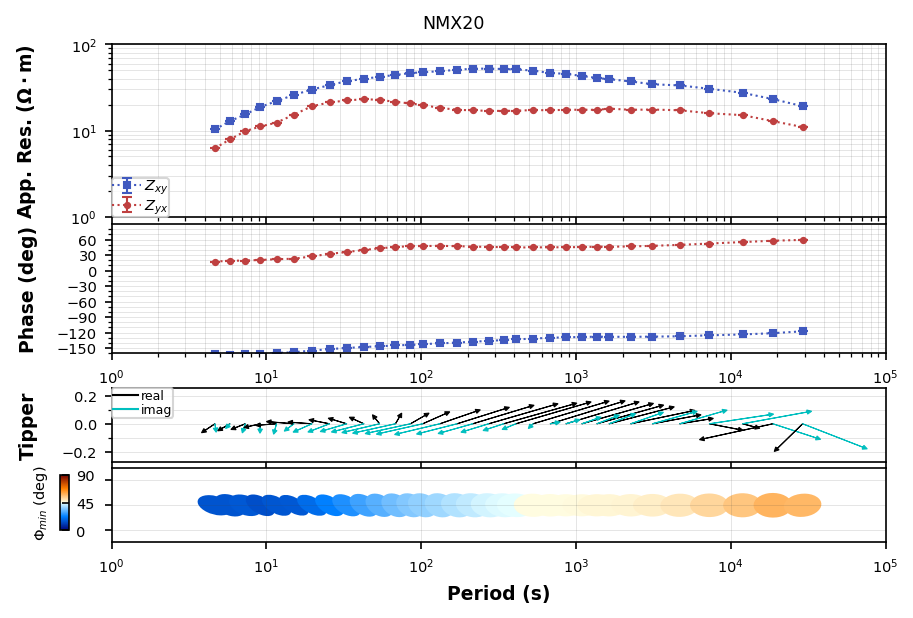
Occasionally you will compute a transfer function that has phase flipped, usually a coil was hooked ub backwards, or the electric lines were hooked up in reverse. If Hz data were collected an easy way to tell is plotting induction vectors for the survey and seeing if any look flipped. That is a good indication the magnetic channels was flipped. Otherwise check the electric channels. Here we will assume that the Ex was flipped so we flip Zxx and Zxy.
[29]:
flipped = mt_object.flip_phase(zxx=True, zxy=True)
flipped.plot_mt_response()
[29]:
Plotting PlotMTResponse
Remove a component
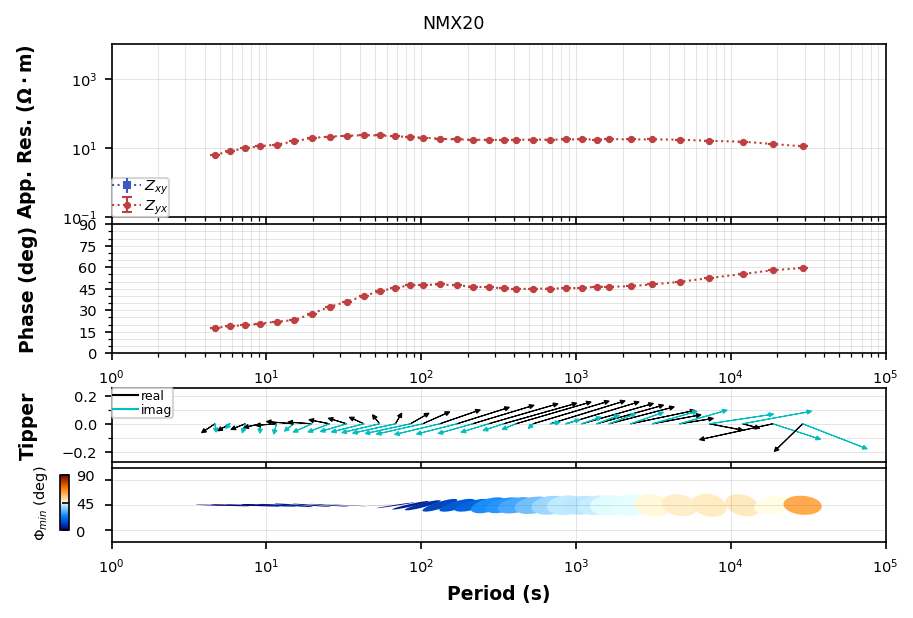
Sometimes data can be terrible for a single component and you may want to remove it before analyzing the data.
[30]:
removed_xy = mt_object.remove_component(zxy=True)
removed_xy.plot_mt_response()
[30]:
Plotting PlotMTResponse
Add White Noise
If you are doing some sensitivity tests or inverting synthetic data adding white noise can be useful. Here we will add 5%
[31]:
adding_white_noise = mt_object.add_white_noise(.05, inplace=False)
[32]:
adding_white_noise.plot_mt_response()

[32]:
Plotting PlotMTResponse
Remove Distortion
Distortion is a pain an usually comes in the form of near surface distortion like a static shift. If you have no other way to estimated distortion, like a TEM measurement or nearby stations a relative estimate can be made using the phase tensor. See Bibby et al., (2005). This basically looks for 1D parts of the transfer function by comparing the TE and TM phases. If the phases match then so should the apparent resistivity. However, knowing the true value of static shift is incomplete and therefore the apparent resistivity curves are pinched together to remove relative static shift.
There might be some issues with uncertainty propagation.
[33]:
distortion_removed = mt_object.remove_distortion(n_frequencies=25)
[34]:
distortion_removed.plot_mt_response()
[34]:
Plotting PlotMTResponse
[ ]: